GE Transportation · 2018–2019

GE Transportation, train automation for 3,000+ locomotives

iPad and in-train interfaces designed to replace manual instruction manuals with an optimized, automated speed and braking system

UI/UX Designer
iOS Developer
Motion Specialist
Sketch · Adobe XD
After Effects · Lottie
Rail automation
Motion design

CONTEXT

Train conductors were driving by manual

As GE Transportation’s product portfolio grew, operating conditions demanded a smarter approach. Conductors navigated dense instruction manuals with route-specific parameters, one for each section of track, each car, and each locomotive, accounting for sharp curves, grade changes, weight variations, and speed limits. The inconsistency led to higher fuel consumption and unplanned stops.

GE needed a system that could replace that manual judgment with real-time automation, without taking control away from the conductor entirely.

Problem

Dense manuals, inconsistent braking decisions, and no unified view of route parameters led to inefficient fuel use and increased operational risk.

Goal

An intuitive iPad interface that surfaced the system's calculated speed profile and helped conductors follow, or hand off to, automated throttle and braking controls.

USER RESEARCH

Understanding how conductors think about their route

Working alongside the UX researcher, I mapped how conductors currently handled trip planning. The core insight: they were mentally tracking multiple overlapping rule sets simultaneously, terrain, load, weather, schedule, with no single decision-support tool to surface conflicts or suggestions.

Imagine a railroad with so many obstacles that, in order to preserve the locomotives, the train operators needed to drive according to different parameters, taking into account unstable and remote areas, sharp curves and speed and acceleration variations.

To give you an idea, train drivers had an instruction manual to drive the train in different sections of the track, with specifications for each car and locomotive, contemplating several territorial and operational factors!

DESIGN PROCESS

Five steps, one flow, from onboarding a trip to handing off to automation

After a brainstorming and sketching phase with the team, I mapped the conductor experience into five clear stages. These became the core navigation architecture for the iPad app, ensuring conductors could always locate themselves in the process and understand what the system was doing next.

1
Initialize trip
Conductor identifies locomotive, train consist, and route. The system pulls relevant parameters from onboard GPS and fleet data.
2
Trip data
Review of route specifics: scheduled stops, distance, estimated fuel load, and time constraints.
3
Train data
System inputs including length, weight, locomotive performance curve, and any special restrictions for the current consist.
4
Restrictions
Speed limits, grade restrictions, and railroad aspects confirmed before the system generates the optimized speed profile.
5
Start trip
Conductor activates Trip Optimizer. Control is handed to the system, with manual override available at any point.

SOLUTION

High-fidelity prototypes and in-train UI

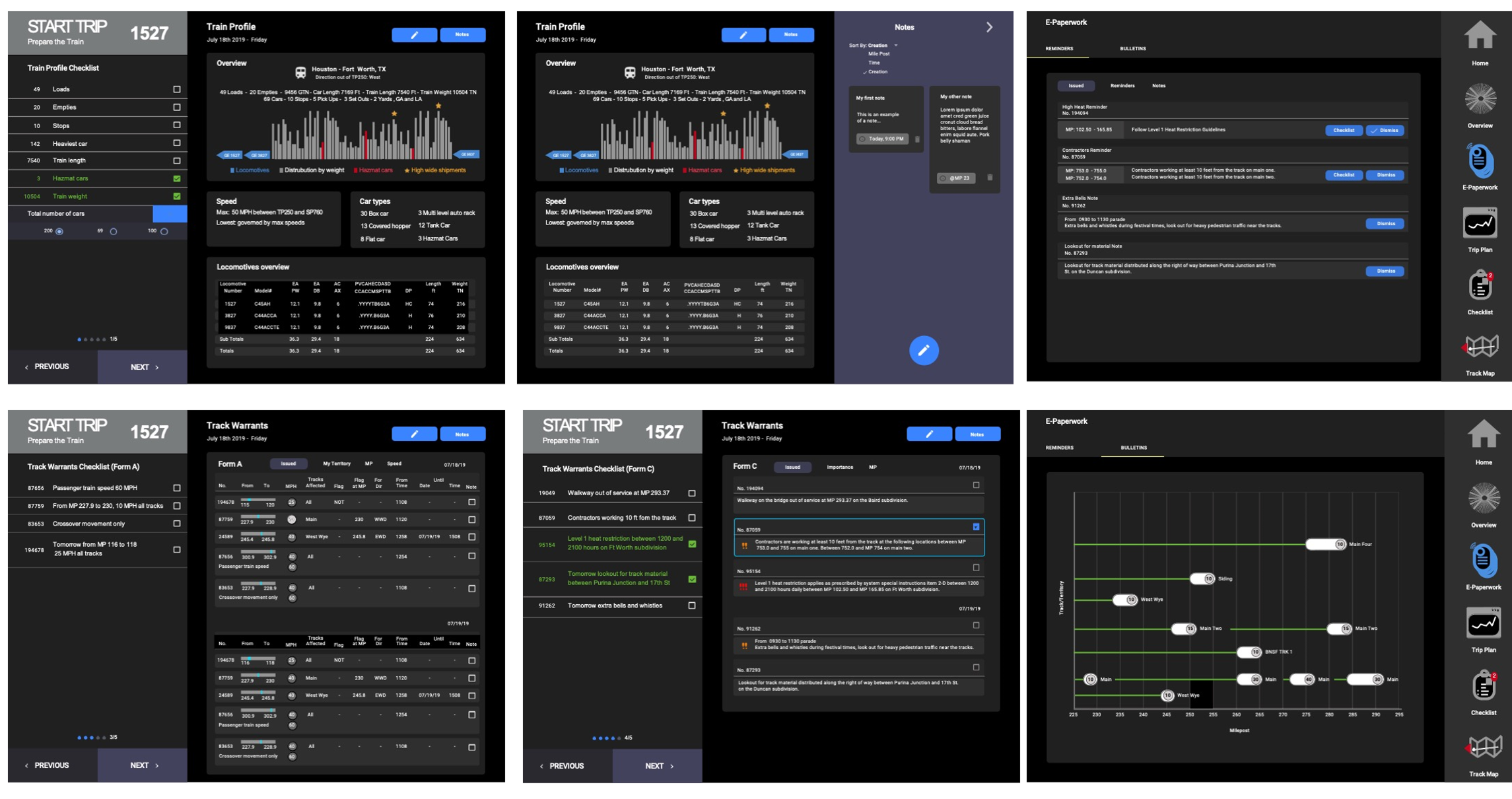
I designed the iPad interface in Sketch and Adobe XD, handled motion design with After Effects and Lottie, and produced all GUI assets for the engineering team.

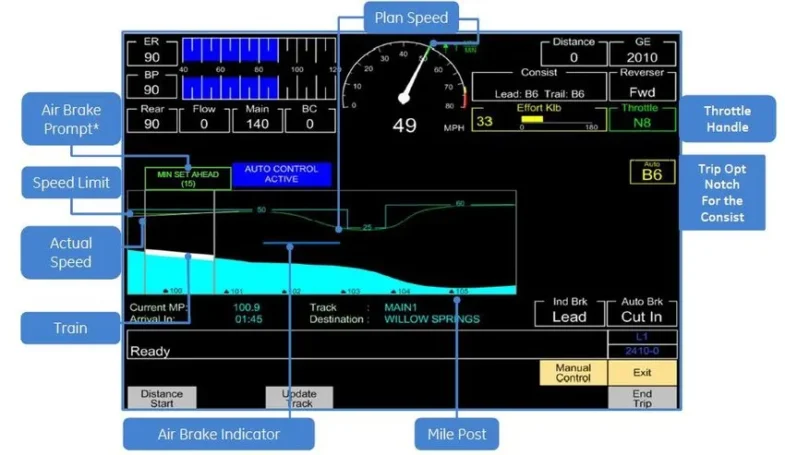
Below are the in-train screens deployed onboard operational trains.

IMPACT

3,000 trains. 16 million kilometers daily.

REFLECTION

What I took away

What I learned
Design in high-stakes environments requires precision
Safety-critical UI taught me to balance user clarity with system complexity. Ambiguity in a conductor screen isn’t a UX problem, it’s an operational risk.
What I’d do differently
I’d invest more time in early onboarding
Joining mid-stream forced me to move fast. Deeper early understanding of system architecture and operational context would have led to stronger architectural decisions sooner.
Cross-functional insight
Embedded design shapes system thinking
Working from prototyping to implementation, alongside researchers, engineers, and rail operations, shifted how the whole team thought about automation. Design at that depth changes product direction.