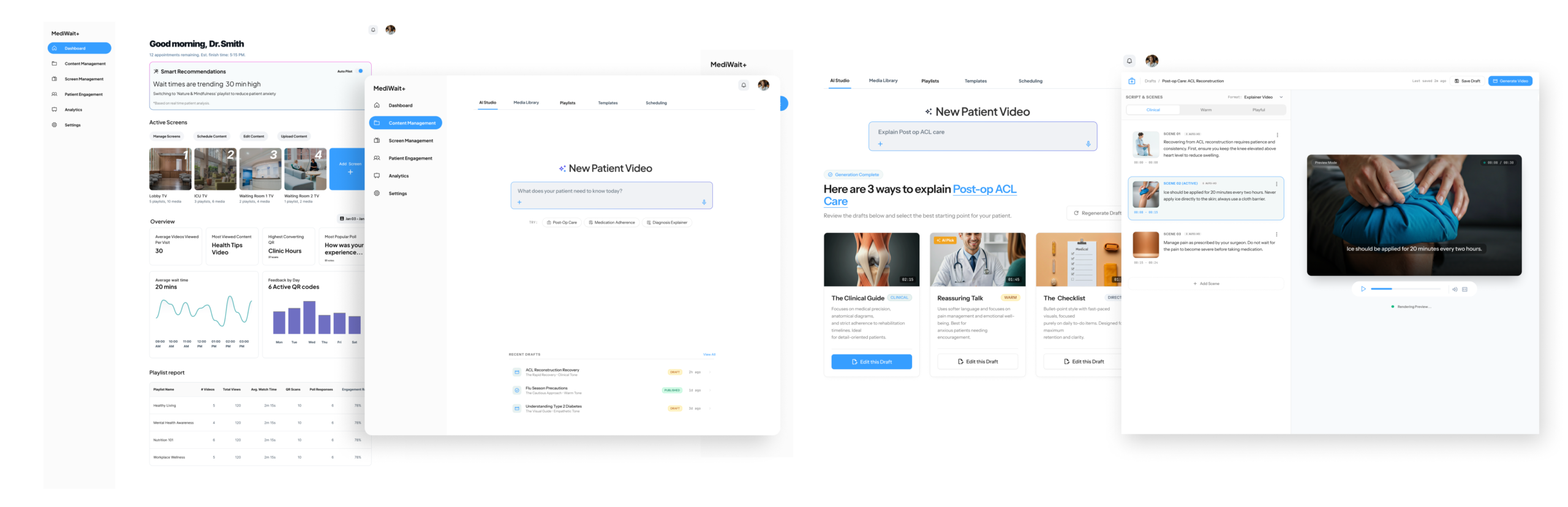
MediWait+ is an AI-powered system that makes waiting rooms smarter. It uses AI video tools and real-time patient feedback to automatically show the right content at the right time. This helps doctors keep patients calm and informed without any extra work.
Self-initiated concept · 2025
Not shipped · Personal exploration
Not shipped · Personal exploration
MediWait+
AI co-pilot for waiting room content, designed to give clinicians intelligent control without adding work
AI interaction design
System logic
Information architecture
Healthcare
Motion design
System logic
Information architecture
Healthcare
Motion design
Lead Product Designer (AI Strategy & Systems)
·
Product vision, AI interaction logic, UX/UI design, motion
·
Product vision, AI interaction logic, UX/UI design, motion
Transforming the Doctor’s Waiting Room Experience with AI
THE PROBLEM
Waiting rooms are a missed opportunity, and doctors know it
Most waiting room screens show passive, outdated, or irrelevant content. Healthcare providers want to educate and engage patients, but they are not video editors, they are clinicians. Every minute spent managing a TV screen is a minute away from patient care.
“I have no idea what’s playing on the waiting room TV right now. I set it up three years ago and haven’t touched it since.”
Research insight, general practitioner
What doctors need
Content that educates patients without requiring manual curation. Automation that feels trustworthy, not out of control.
What existing tools offer
Static playlist managers. Manual video editors. No intelligence. No feedback loop from patient behavior.
DECISION 1 OF 2
Should the AI act automatically or ask first?
The core tension in any AI product: automation vs control. When wait times spike, the AI detects stress signals and wants to help. The question was whether to act silently or surface a recommendation.
Option A — rejected
Silent automation
AI switches content mode automatically when conditions are met. No doctor input required.
Problem
Doctors lose trust immediately when things change without their knowledge. Healthcare context makes this worse — clinical environments require human accountability.
Option B — chosen
Human-in-the-loop recommendation
AI surfaces a recommendation card with context. Doctor approves, edits, or dismisses with one tap.
Result
Doctors feel in control. The AI feels like a helpful assistant, not a system acting behind their back. Adoption is higher when trust is built first.
THE RECOMMENDATION FLOW
Wait time spikes
→
Patient mood signal (QR poll)
→
AI recommendation card
→
Doctor reviews
→
Apply / Edit / Dismiss
DECISION 2 OF 2
One interface or two? The bimodal IA problem
Doctors range from “just make it work” to “I want to control every frame.” A single interface would either overwhelm the busy clinician or frustrate the detail-oriented one. I designed two explicit paths into the same system.
Fast path — AI Studio
Type a goal, get a video
Doctor types a clinical intent (“Explain flu vaccine benefits”). AI generates three storyboard options. One tap to apply, auto-branded with clinic colors.
For: busy staff
45 min → <3 clicks
45 min → <3 clicks
Manual path — scene editor
Refine every frame
Scene-by-scene editor exposes the AI draft. Lock visuals, swap text, adjust timing. AI handles motion and transitions — human controls intent and content.
For: detail-oriented users
Full editorial control
Full editorial control
UI - SELECTED SCREENS
The Dashboard
Designed around one job: give the doctor a signal when something needs attention. The AI recommendation card is the visual hero, everything else is secondary context.
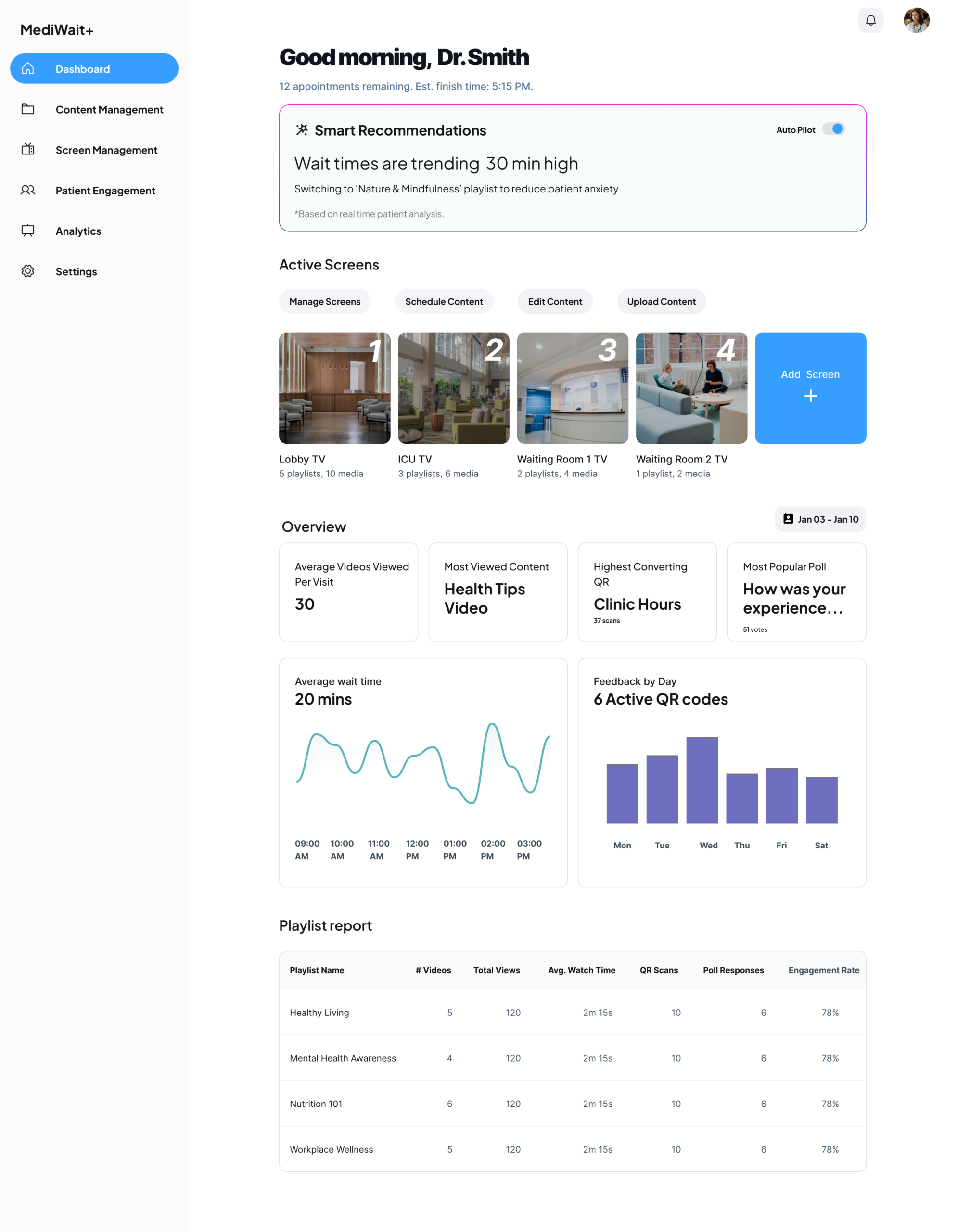
Smart AI Recommendations: The “Hero” of the dashboard. It monitors wait times and patient mood, then suggests the best content to show right now to keep patients calm.
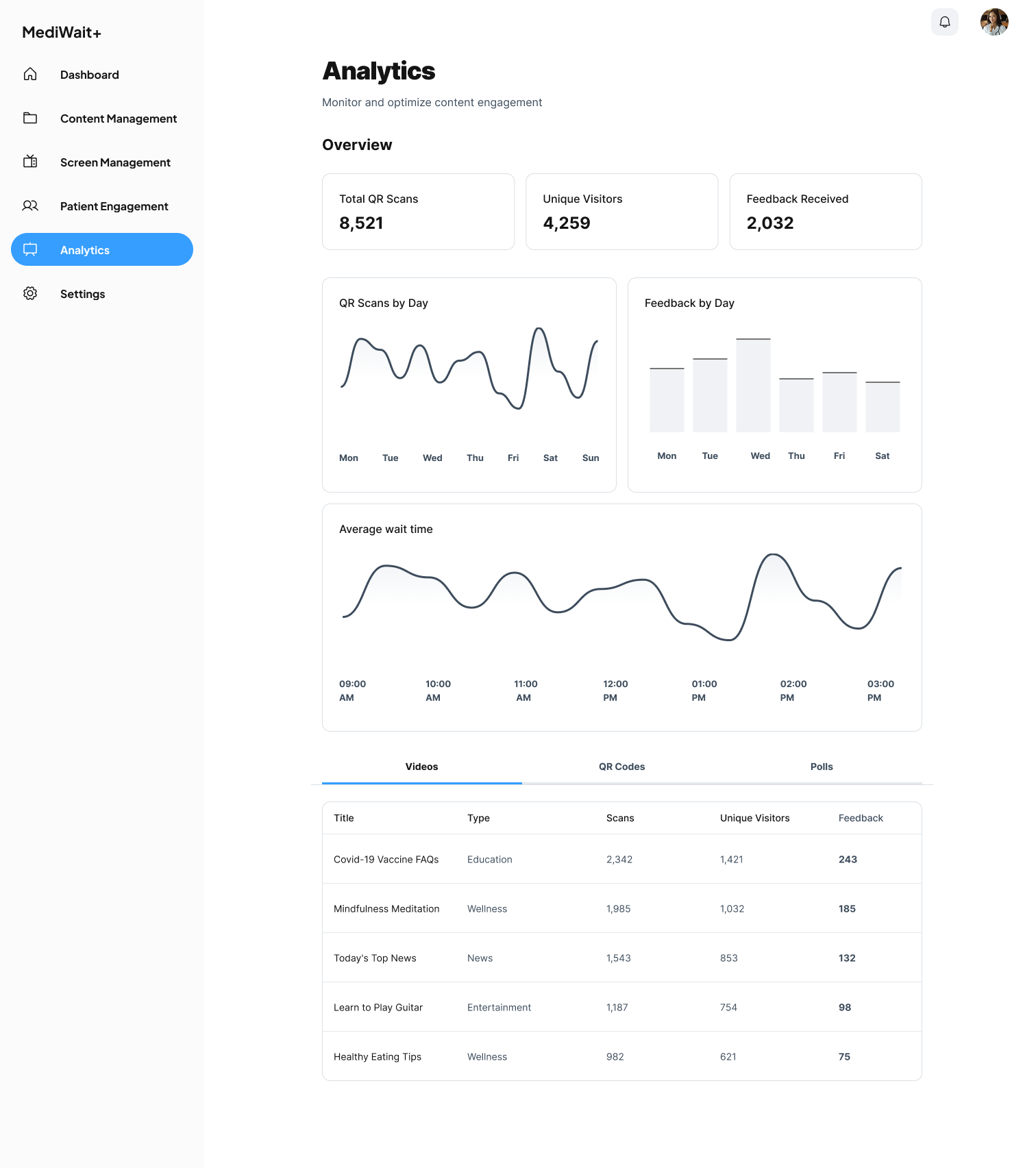
Analytics Overview – High-level insights with charts and visualizations showing patient interactions, content engagement, and screen activity.
Active Screens – Monitor and manage all waiting room displays in real time.
Playlist Report – Understand which content resonates most with patients through QR code scans, poll responses, and watch duration metrics.
Content Management
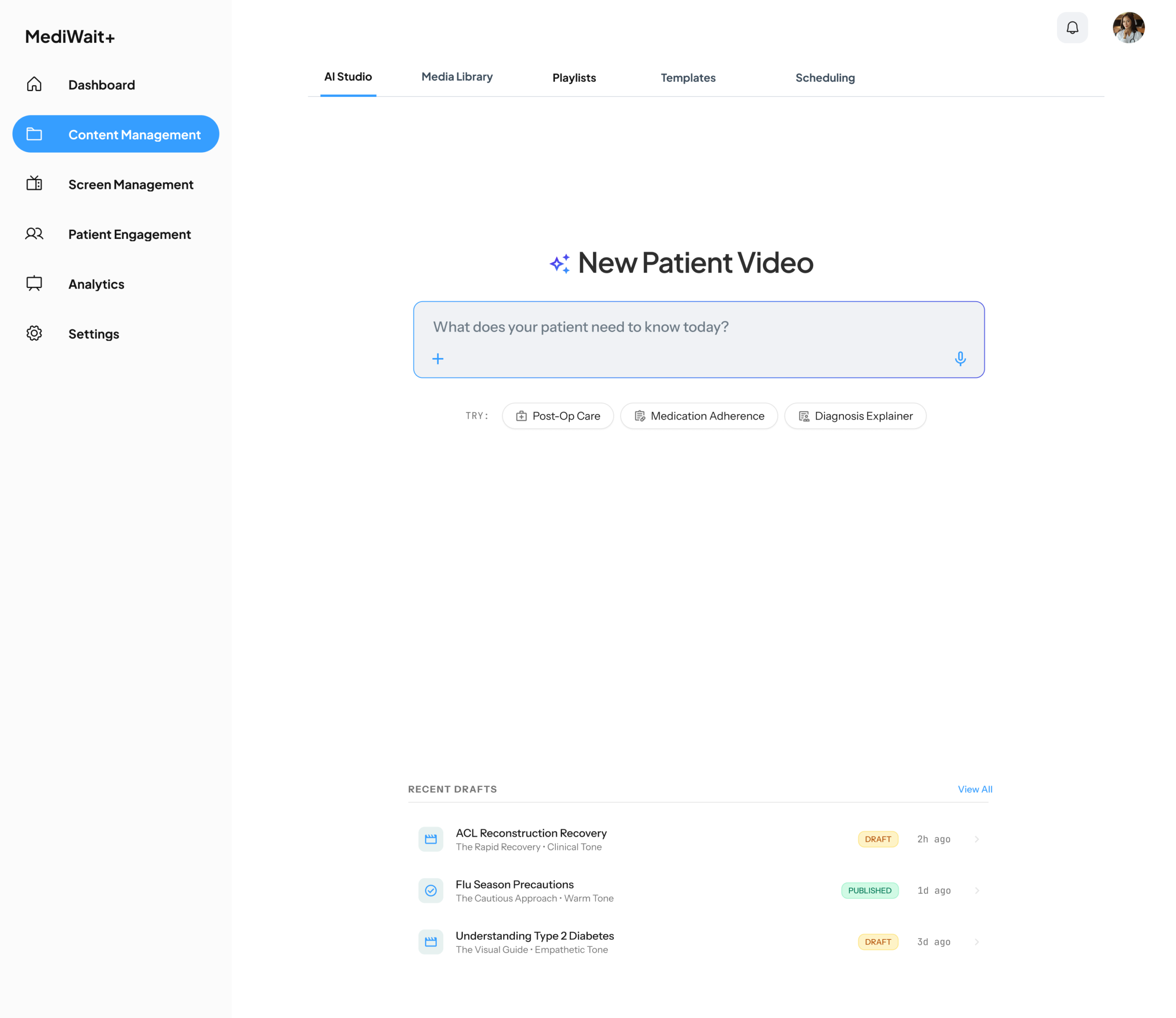
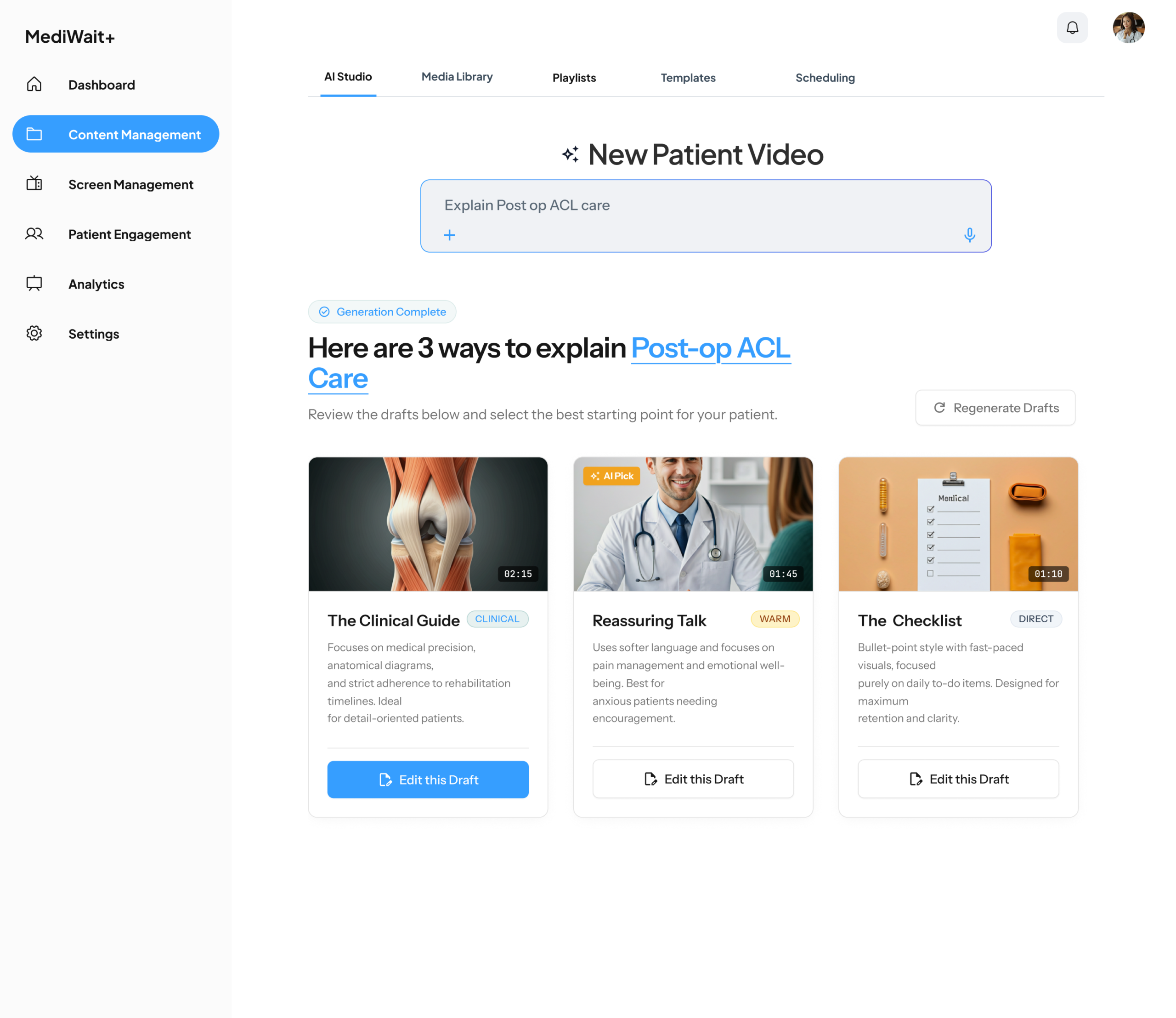
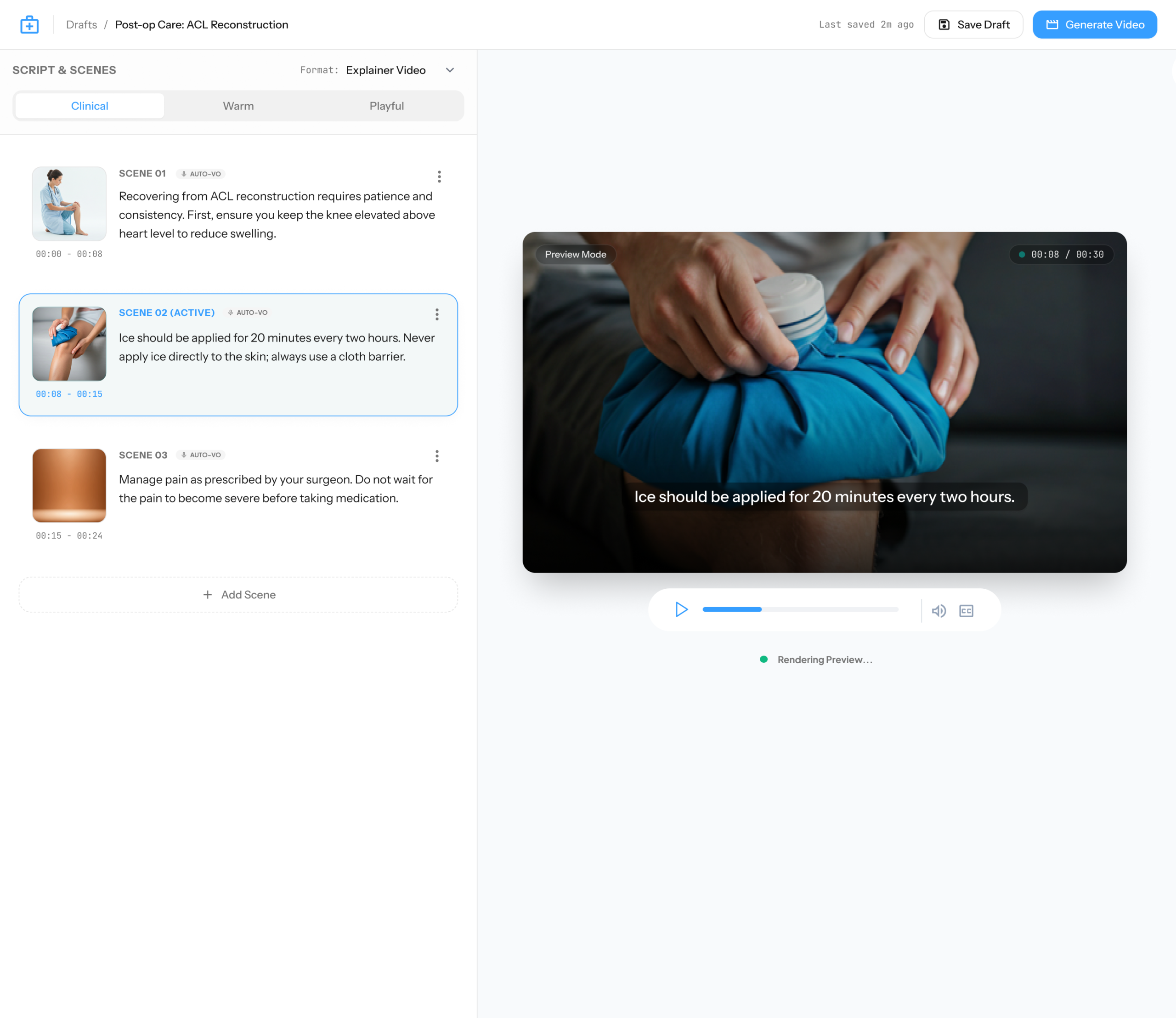
This is the creative heart of MediWait+. I designed it to remove the technical barriers of video production, allowing doctors to go from a simple idea to a high-quality video in minutes.
- AI Studio (The Fast Path): The primary tool for busy staff. Doctors can type a clinical goal, and the AI generates three cinematic storyboards to choose from, saving hours of manual work.
- Scene-by-Scene Editor: For those who want more control, I designed a modular editor. It allows users to refine AI-generated drafts, lock specific visuals, and swap out text while the AI handles the timing and motion.
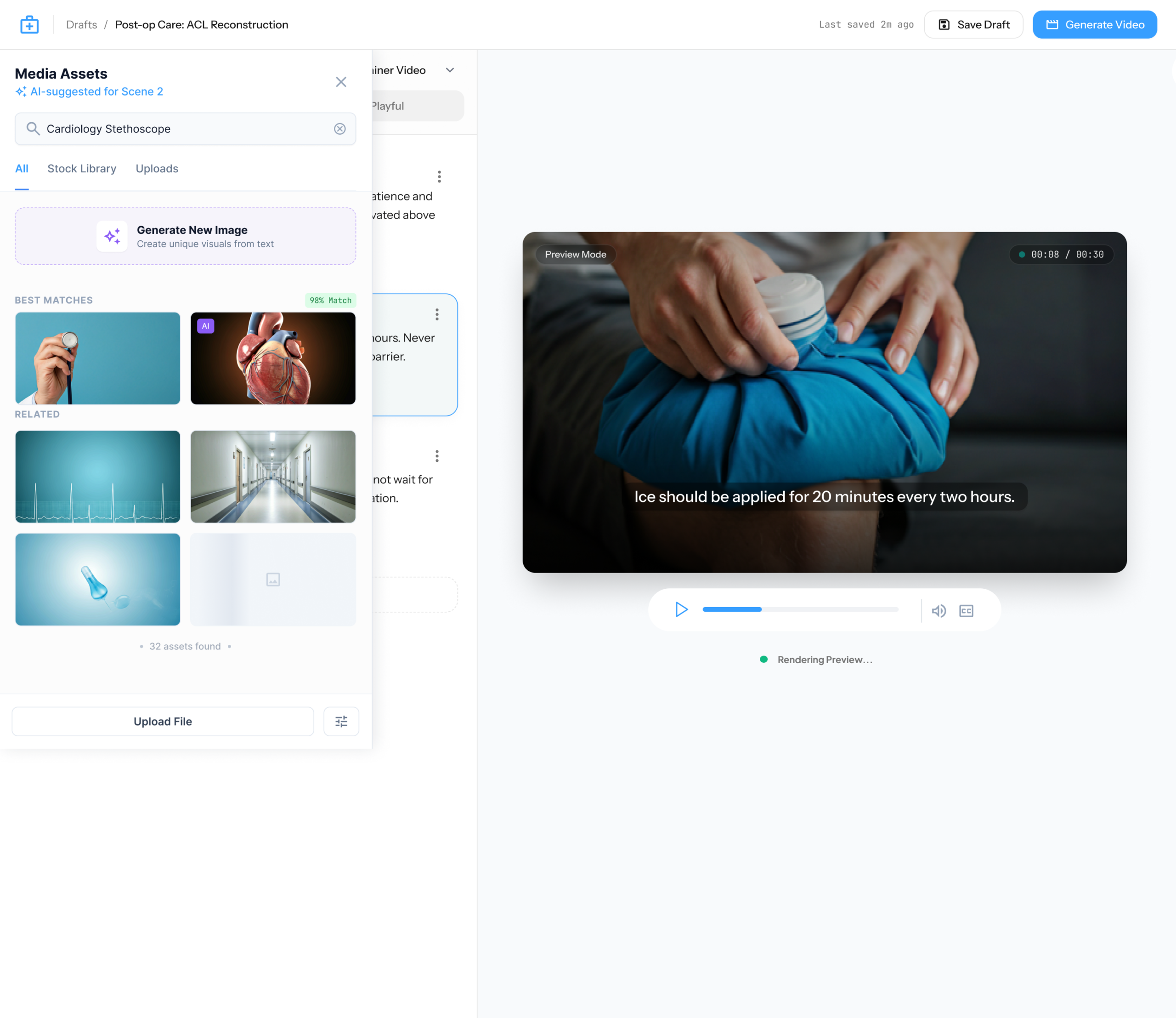
- Smart Media Library: A unified library that uses AI to organize assets. Doctors can search for content by “mood” or “vibe” (like Calming or Educational) rather than just searching for filenames.
- One-Click Templates: A collection of pre-made layouts that “auto-brand.” When a doctor picks a template, the AI instantly applies the clinic’s colors and fonts to ensure a professional look.
Screen Management
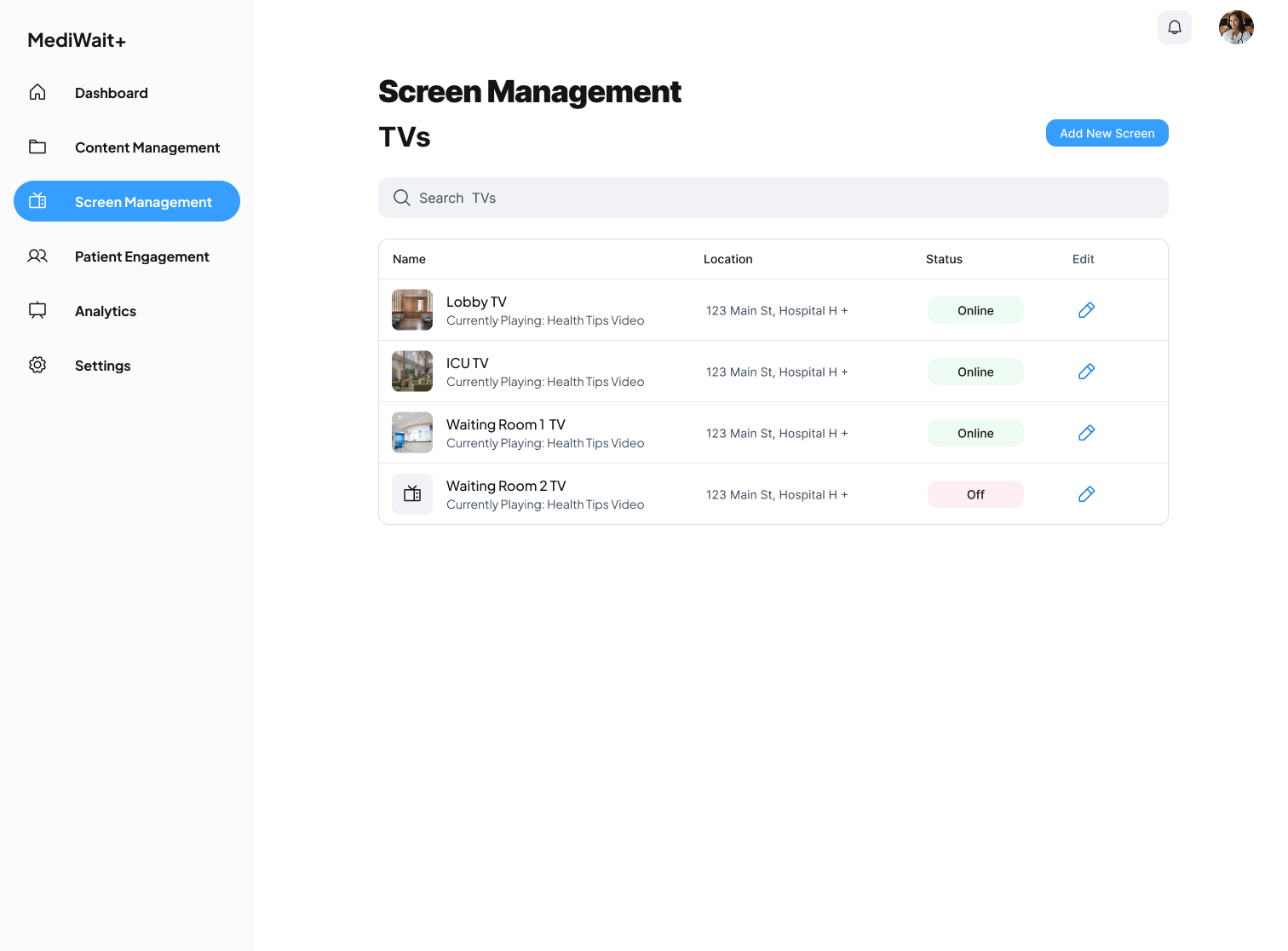
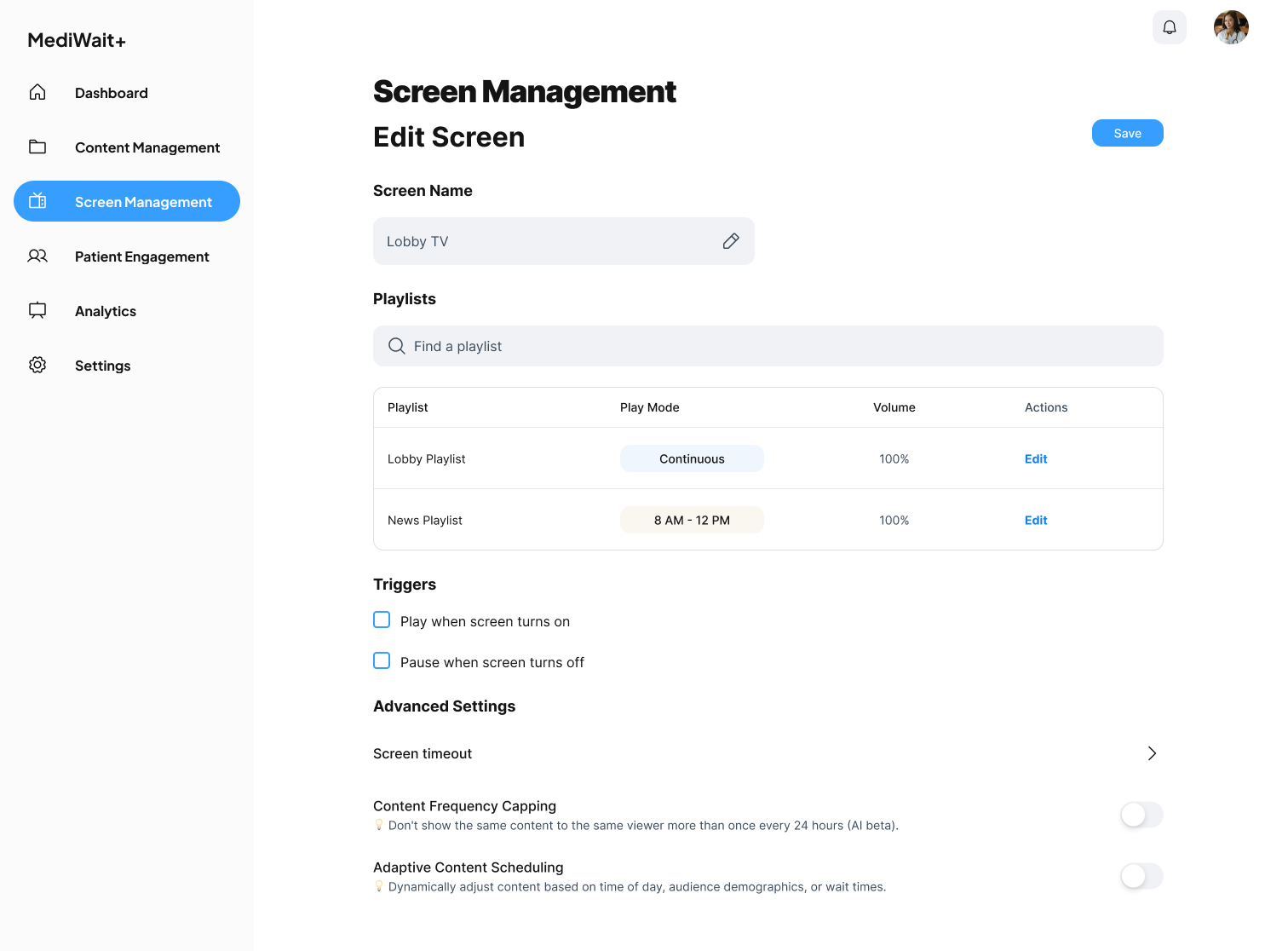
The Screen Management UI provides doctors with a seamless way to add, edit, and organize screens across their practice. With an intuitive interface, they can assign playlists to specific TVs, ensuring the right content reaches the right audience.
Patient Engagement
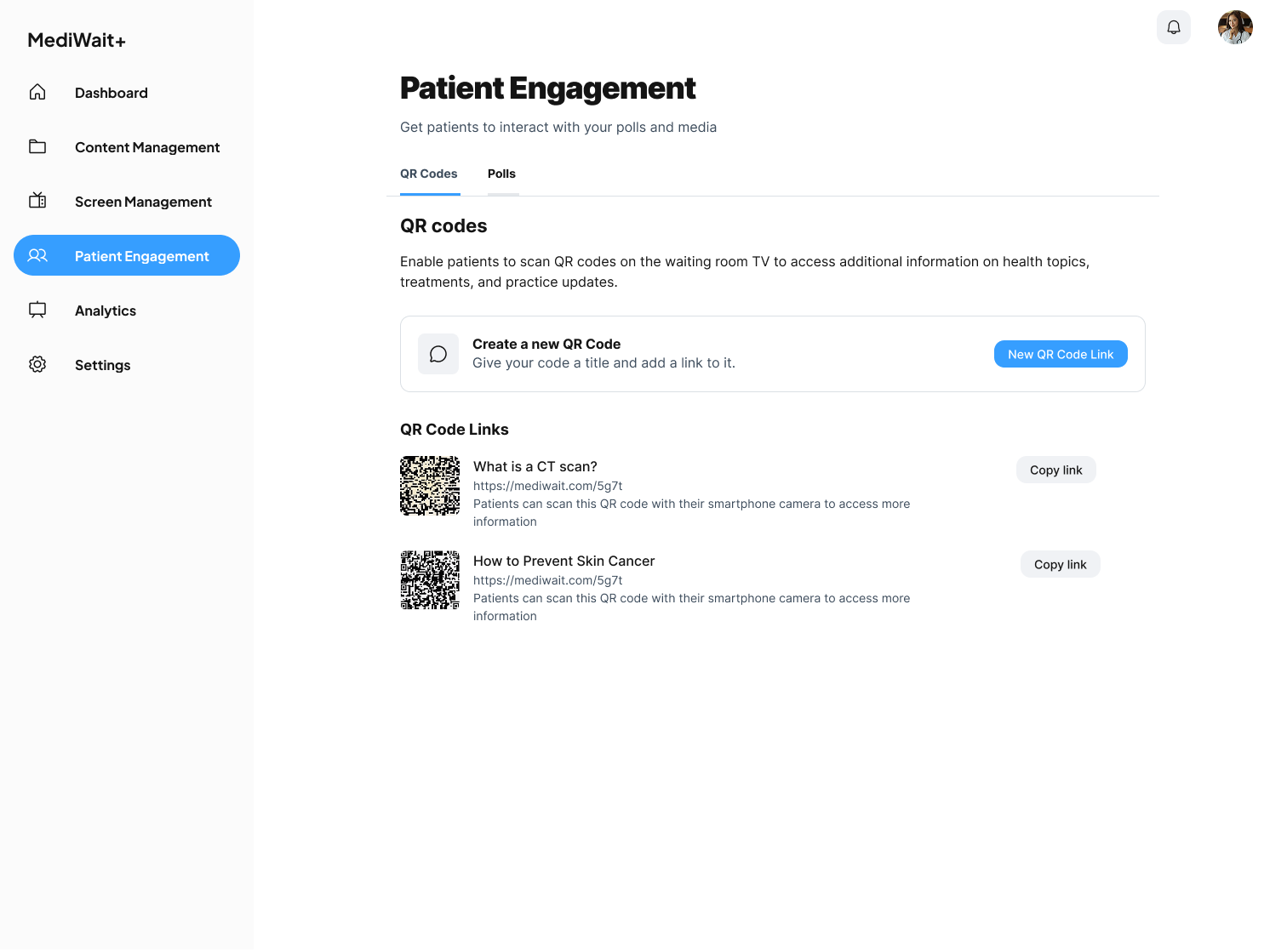
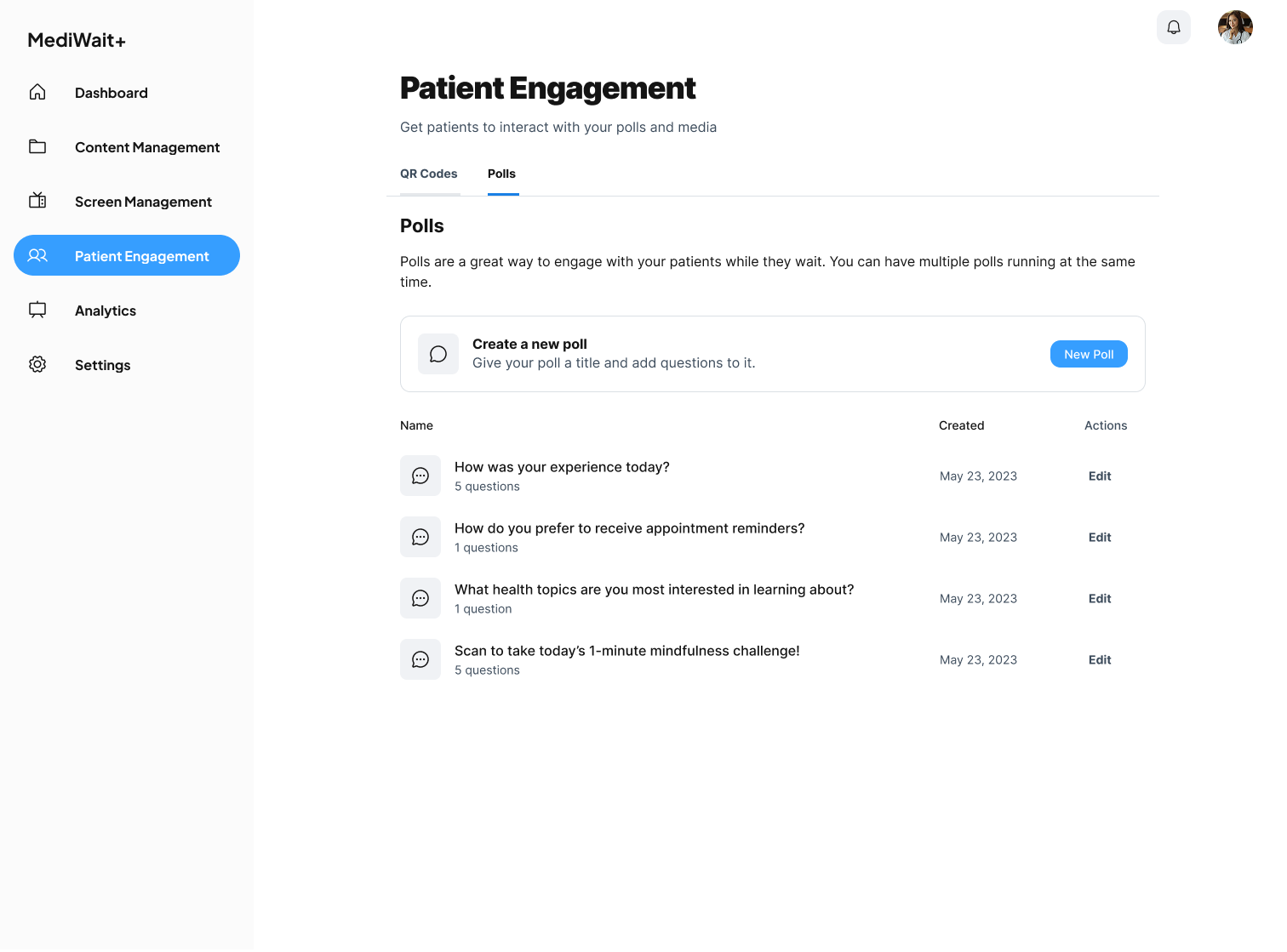
The Patient Engagement feature enhances the waiting room experience by allowing patients to interact with content through polls and QR codes. Doctors can create custom polls to gather patient feedback in real time, helping to improve services and address patient concerns. Additionally, QR codes linked to educational resources enable patients to learn more about symptoms, conditions, and treatment options on their smartphones, extending the value of in-office content beyond their visit.
REFLECTIONS
What this project was really about
Insight 1
Data is only useful if it leads to action
Showing “wait time: 22 min” is useless. Showing “wait time is high — here’s what you can do right now” changes behavior. The AI’s job is to close the loop from signal to suggestion.
Insight 2
Trust in AI is earned incrementally
Doctors don’t trust automation until they’ve seen it work correctly several times. The confirmation step isn’t friction — it’s trust-building. I would design the AI to be conservative early and earn more autonomy over time.
Insight 3
Reducing blank canvas anxiety is a UX problem
The hardest moment for a non-designer is the empty prompt field. The Fast Path exists to remove that moment entirely — give the doctor a starting point, not a blank slate.
Why I built this
My primary work at GE Aerospace is under NDA. This project let me explore AI interaction design in a different context, a human-facing, emotionally loaded environment rather than an industrial one. The design questions here (when should AI act autonomously? how do you build human-AI trust?) are the same ones I think about every day.